When Every Key Has a Job: A Shortcut Keyboard for Česká Televize
How a colour-coded shortcut keyboard helps a broadcast team edit faster.
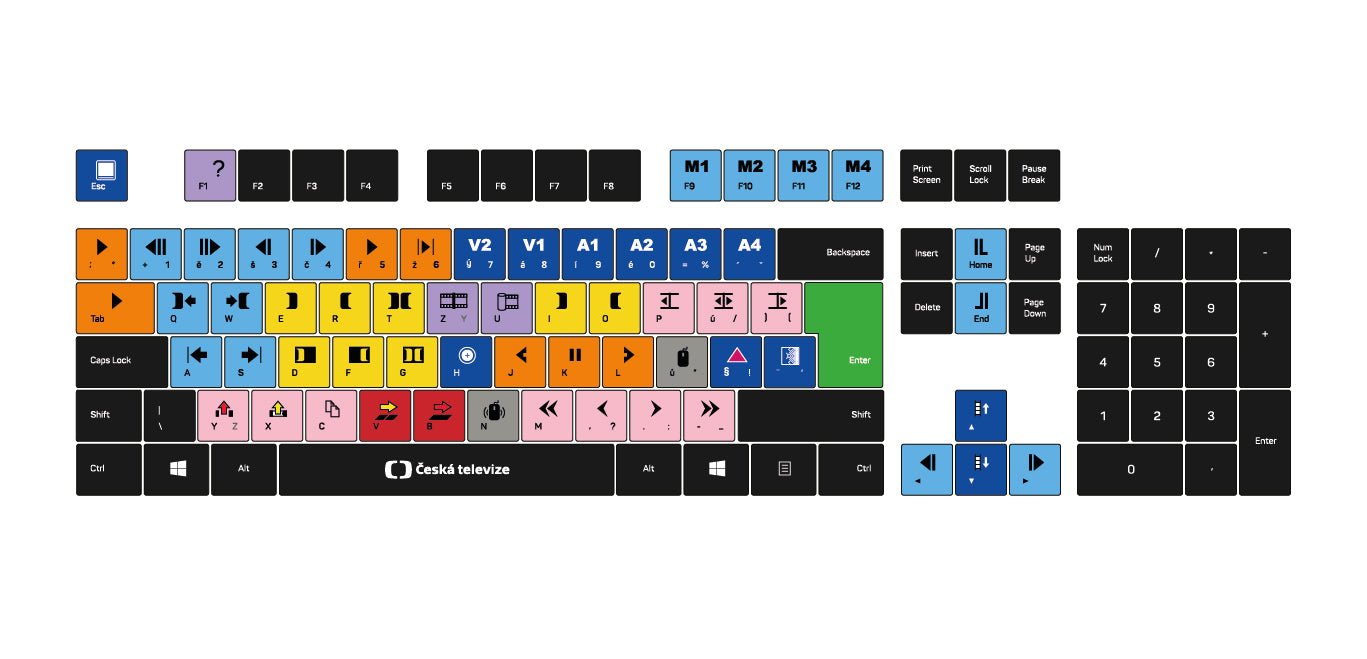
Most custom keyboards are built around branding: a logo, brand colours, a company name on the spacebar. The brief from Česká Televize, the Czech national public broadcaster, was different. They needed a keyboard their editors could use as a working tool.
Every key mapped to a production shortcut. Every group of functions colour-coded, so an editor's hand finds the right key without looking down. A full-size, 104-key layout with each key carrying a purpose.
Why editors need it
Video editing and broadcast production run on keyboard shortcuts: playback, trimming, audio levels, video channels, markers and more. On a standard keyboard nothing tells you which key does what. Editors either memorise it all or put a shortcut overlay on top of their keys.
Česká Televize wanted to remove that friction. Instead of overlays or stickers, the shortcuts are printed directly into the keycaps of a dedicated keyboard that any editor can sit down with and understand.
What the colours mean
- Orange: playback and transport controls
- Yellow: edit and trim functions
- Blue: video and audio channel selectors
- Light blue: navigation and secondary controls
- Lilac: timeline and sequence functions
- Pink: audio and secondary edit tools
- Green: confirm and enter actions
- Red: critical or destructive actions
The function row carries four macro keys for the most-used actions, and the spacebar carries the Česká Televize logo, so the branding does not take any working keys.
All legends are printed with dye sublimation, which fuses the ink into the keycap. They will not fade, chip or peel, which matters when the same keys are pressed hundreds of times a day.
What changes for the team
Editors often spend years learning shortcuts, and start over with every new system or software update. A colour-coded keyboard shortens that learning curve: orange is transport, blue is channels, and the hand goes to the right zone before the editor has finished thinking.
Česká Televize ordered ten keyboards, one per editor. Everyone's shortcuts are in the same place, which keeps working practices consistent and makes onboarding a new editor faster.
Who else this works for
- Video and film production: Premiere Pro, DaVinci Resolve or Avid Media Composer
- Design studios: Photoshop, Illustrator and Figma power users
- Audio production: Pro Tools, Logic or Ableton Live
- Trading and finance: fast, repeated actions where a wrong key is costly
Send us your shortcut layout and colour logic, and we design, produce and ship the keyboards. See our custom keyboards, or for a smaller set of shortcuts, a custom macropad.

Mission statement isn't a static asset you design once and forget. It is a live promise. In a fast-paced market where users have endless alternatives at their fingertips, authenticity isn't a design aesthetic—it’s the ultimate competitive advantage.
Mission statement isn't a static asset you design once and forget. It is a live promise. In a fast-paced market where users have endless alternatives at their fingertips, authenticity isn't a design aesthetic—it’s the ultimate competitive advantage.
Mission statement isn't a static asset you design once and forget. It is a live promise. In a fast-paced market where users have endless alternatives at their fingertips, authenticity isn't a design aesthetic—it’s the ultimate competitive advantage.